
Welcome to the Machine Vision Resources page. Here, you will find some important information on machine vision related topics, as well as links to external website where you can get useful information to help you expand your knowledge in this field.
Machine vision lenses
Machine vision software
OpenCV-Python codes for specific applications
1. Determine diameter of a pin gauge captured using backlight.

Download image here!
Contact trainer for OpenCV-Python codes
2. Detect edge in grayscale image to subpixel accuracy

Download image here!
Download OpenCV-Python code here!
3. Count the number of yellow-colored pins
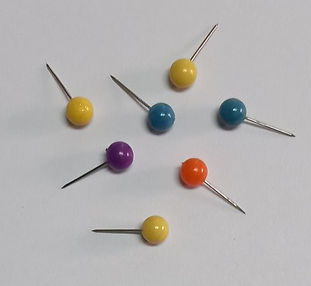
Download image here!
Contact trainer for OpenCV-Python codes
4. Detect scratch mark on photomask


Download test image here!
Contact trainer for OpenCV-Python codes
5. Find color values in BGR format by clicking on image

Download test image here!
Contact trainer for OpenCV-Python codes
6. Read resistor color code

Download test image here!
Contact trainer for OpenCV-Python codes
This section contains some simple OpenCV-Python codes that you may find useful
(See here if you want to know how to install OpenCV-Python)
Code 1: Generate simulated fringe patterns of various wavelengths (pitches)

import cv2 as cv
import numpy as np
import math
I1 = np.zeros((300,300), np.uint8)
p = 0.06 # p controls the fringe pitch
for i in range(0,300):
for j in range(0,300):
I1[i,j] = ((2+2*math.cos(p*math.pi*j))*1/4)*255
cv.imshow('Fringe pattern',I1)
cv.imwrite('fringe.jpg',I1)
cv.waitKey(0)
cv.destroyAllWindows()
Code 2: Find average of four grayscale images captured using four directional lightings


import cv2 as cv
import numpy as np
# read images
I1 = cv.imread('image1a.jpg',0)
cv.imshow('Image 1',I1)
I2 = cv.imread('image1b.jpg',0)
cv.imshow('Image 2',I2)
I3 = cv.imread('image1c.jpg',0)
cv.imshow('Image 3',I3)
I4 = cv.imread('image1d.jpg',0)
cv.imshow('Image 4',I4)
# normalize images
I1n = I1/255
I2n = I2/255
I3n = I3/255
I4n = I4/255
# find size of image
m = I1.shape[0]
n = I1.shape[1]
# find average of all images
I_avg = np.zeros((m,n))
for i in range(0,m):
for j in range(0,n):
I_avg[i,j] = (I1n[i,j]+I2n[i,j]+I3n[i,j]+I4n[i,j])/4
I_out = I_avg*255
I_out2 = I_out.astype(np.uint8)
# brighten image
I_out3 = I_out2+30
cv.imshow('Average image 2',I_out3)
cv.waitKey(0)
cv.destroyAllWindows()
Output
Code 3: Detect subpixel edge in grayscale image
(Note: The code is based on the moment invariant algorithm first developed by A.J. Tabatabai and O.R. Mitchell, 'Edge Location to Subpixel Values in Digital Imagery' - DOI: 10.1109/TPAMI.1984.4767502)

import cv2 as cv
import numpy as np
import matplotlib.pyplot as plt
import math
# read input image
I1 = cv.imread('image2.tif',0)
# display image
cv.imshow('Input image',I1)
plt.imshow(I1,cmap='gray')
# get image size
m = I1.shape[0]
n = I1.shape[1]
k1 = np.arange(n,dtype=float)
k2 = np.arange(n,dtype=float)
for j in range(0,n):
arr1 = np.array(I1[0:m,j],dtype=np.int64)
m1 = sum(arr1)/m
m2 = sum(np.square(arr1))/m
m3 = sum(np.power(arr1,3))/m
sg = math.sqrt(abs(m2 - m1**2))
s = (m3+2*m1**3-3*m1*m2)/sg**3
p1 = (1+s*(math.sqrt(1/(4+s**2))))/2
p2 = 1-p1
h1 = m1-sg*(math.sqrt(p2/p1))
h2 = m1+sg*(math.sqrt(p2/p1))
k1[j] = p1*m
k2[j] = p2*m
plt.plot(np.arange(n),k1,'r',linewidth=1.2)
plt.xticks([]), plt.yticks([]), plt.show()
cv.waitKey()
cv.destroyAllWindows()
Code 4: Detect damage on pill tablet using webcam and Arduino board
(Note: This code will enable you to develop a simple machine vision system using a webcam and output the result of inspection by lighting up LEDs on an Arduino board)


import cv2 as cv
import pyfirmata
import time
cam = cv.VideoCapture(0)
result, I1 = cam.read()
I2 = I1[150:400,150:400]
cv.imshow("Cropped image", I2)
I3 = cv.cvtColor(I2,cv.COLOR_BGR2GRAY)
cv.imshow("Gray image", I3)
ret,I3bw = cv.threshold(I3,150,255,cv.THRESH_BINARY)
cv.imshow('After threshold',I3bw)
# determine area
output = cv.connectedComponentsWithStats(I3bw,8,cv.CV_32S)
stats = output[2]
area = stats[1][cv.CC_STAT_AREA]
print('Area = ',area)
board = pyfirmata.Arduino('COM3')
if area > 3300:
print('PASSED')
board.digital[11].write(1)
time.sleep(1)
elif area < 3300:
print('FAILED')
board.digital[12].write(1)
time.sleep(1)
cv.waitKey(0)
cv.destroyAllWindows()
board.digital[11].write(0)
board.digital[12].write(0)